Updating your component version
Learn how to release updates to your Marketplace component.
After you publish a component in the Marketplace, its version will be locked to the most recently released update. Any changes you make after publishing will not be available until you release a new version.
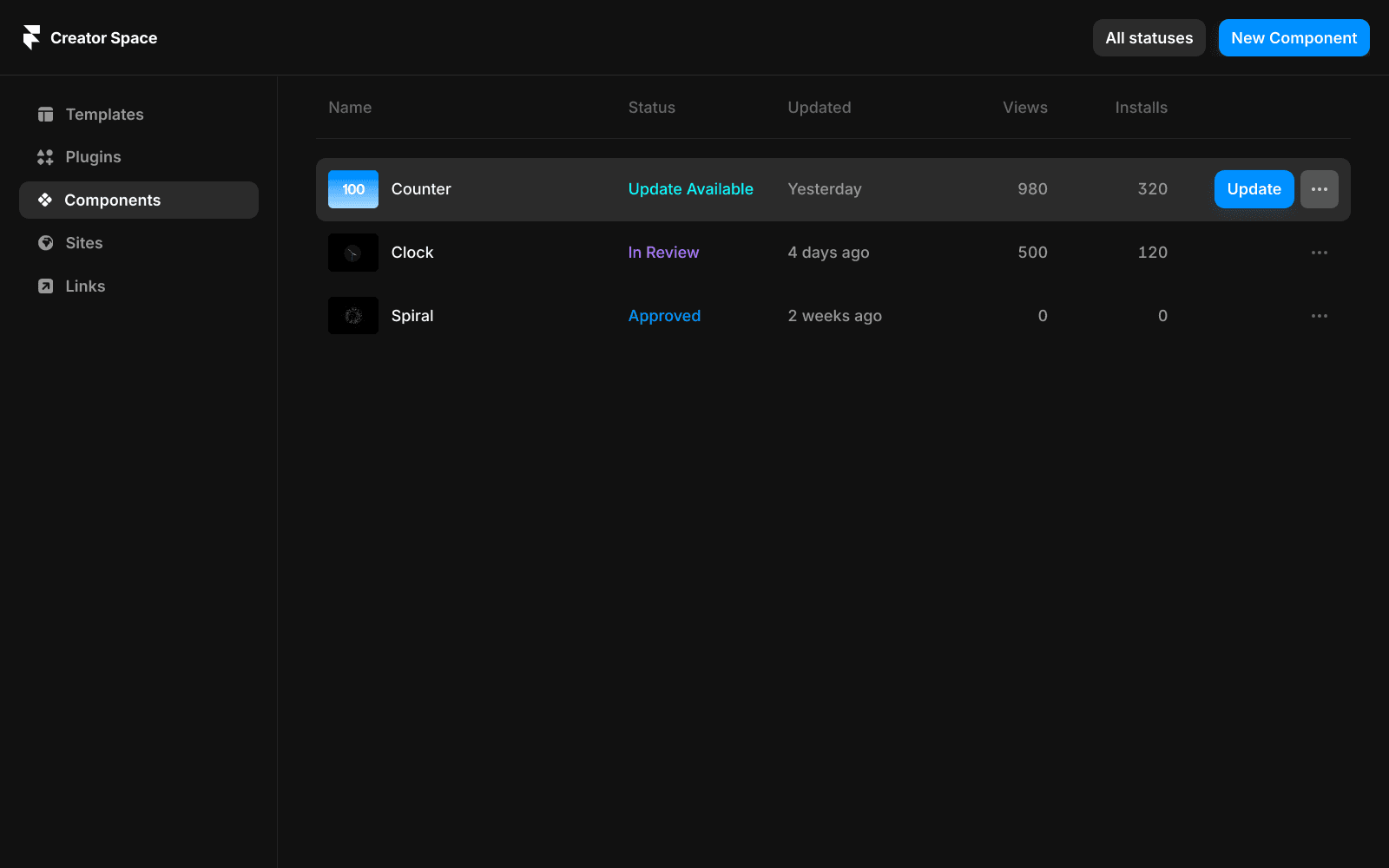
When a new version is ready, the component’s status changes from Published to Update Available.
To publish the new version, open the Creator Dashboard and click Update next to your component. The latest version will then be available in the Marketplace.
If you have questions or require further help, please contact our support team at creators@framer.com.
How do I update my component in the Framer Marketplace after making changes?
After you publish a component in the Marketplace, its version will be locked to the most recently released update. Any changes you make after publishing will not be available until you release a new version. When a new version is ready, the component’s status changes from 'Published' to 'Update Available'. To publish the new version, open the Creator Dashboard and click 'Update' next to your component. The latest version will then be available in the Marketplace.
Why aren't my recent changes to a published component showing up in the Marketplace?
Once a component is published in the Marketplace, its version is locked to the most recently released update. Any changes you make after publishing will not be available until you release a new version. You need to publish the new version for your changes to appear in the Marketplace.
Where can I get help if I have issues updating my component version?
If you have questions or require further help, please contact our support team at creators@framer.com.
Updated