Search
Build professional websites with an AI-powered no-code website builder
Framer is an AI-powered no-code website builder for professional sites. Start with a prompt, then refine the layout, type, and interactions on a flexible visual canvas. Use AI agents, Framer’s CMS, SEO tools, analytics, and managed hosting to build, publish, and improve your site without a developer.
Canvas
Site
·
main
12



Invite
Publish
Pages
Layers
Assets
Home
Search…
Desktop
Primary
Main
Top Bar
Logo
Navigation
Hero
Text
Image
About
Services
Footer
Tablet
1199 — 810
Phone
809 — 0
100%
Desktop
1200

Social Asset 1

Investing, Automated.

Parallel®
Parallel is your AI co-pilot for smarter investing. It analyzes markets, manages risk, and grows your portfolio 24/7.
Social Asset 2

Parallel®
Investing on autopilot, with you in control.
Get early access
Paul
Monika
Agent
Style
Position
Type
Relative
Size
Width
900
Fixed
Height
325
Fit
Min Max
Layout
Styles
Visible
Yes
No
Opacity
1
Fill
999999
Border
Shadows
Radius
20
Padding
20
Filters
Sorting
Pagination
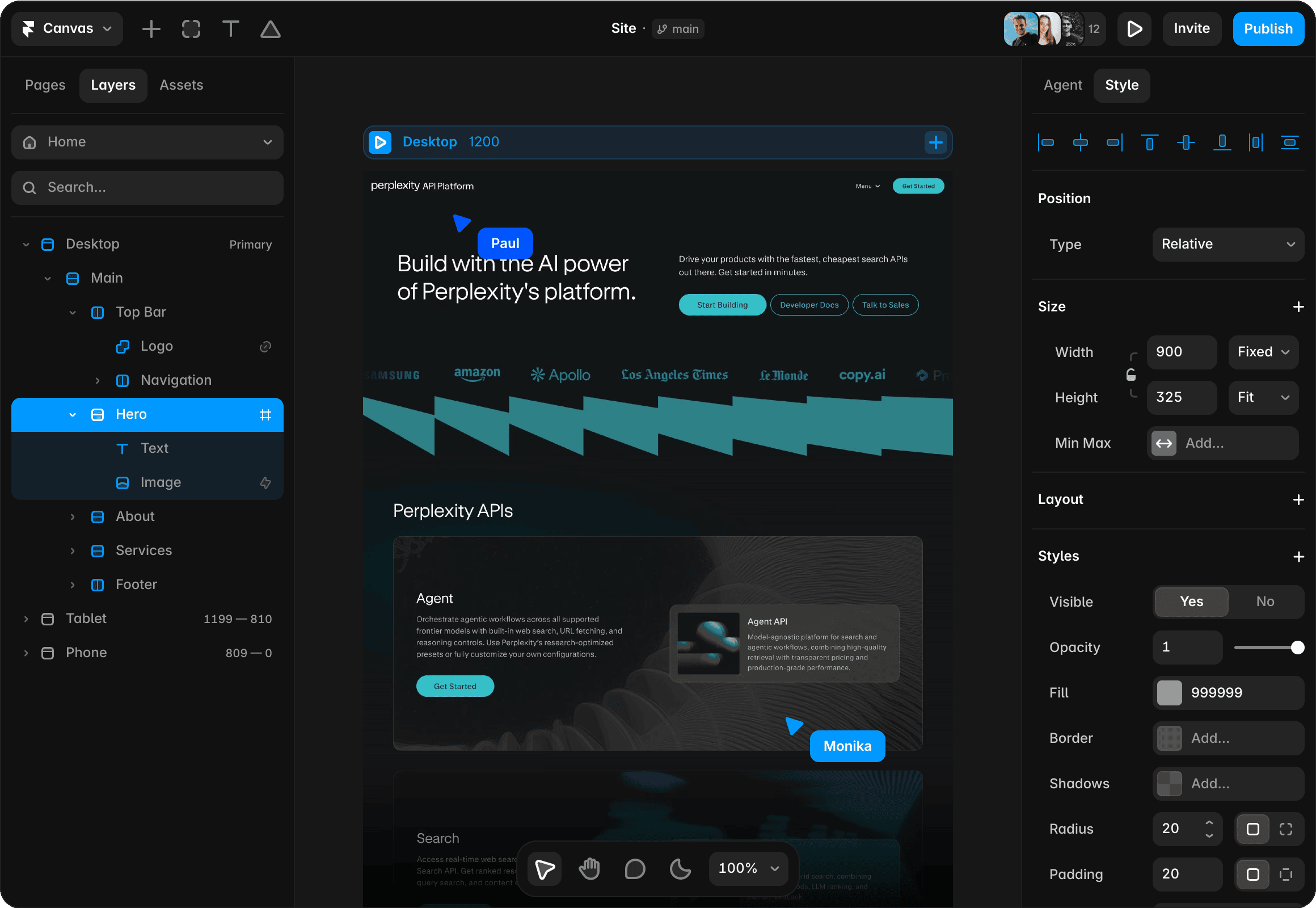
A no-code website builder with visual design control
Create with AI, refine without constraints
Generate a starting point with Framer AI, then shape the site on a flexible visual canvas. Build marketing sites, portfolios, landing pages, and CMS-driven sites with control over layout, typography, interactions, and responsive behavior.
Feels just like Figma
If you are comfortable in Figma, you will feel at home in Framer. With drag-and-drop interactions, smart layouts, reusable components, and AI agents, teams can design and update websites.
Optimized for performance & SEO
Framer delivers fast websites with built-in SEO controls and performance optimization. This helps pages load quickly, stay visible, and feel smooth on every single device for visitors everywhere.
Why teams choose Framer without code

Unlike template-based builders, Framer lets you design websites exactly the way you want, without limitations. Agents can help generate alternatives without locking you into them.

Framer automatically optimizes for peak website performance and SEO controls. AI can help review metadata, structure, and page quality without extra plugins.

Work together in real time, make instant edits, and publish live websites with one click, all from a shared design canvas. Everyone sees changes as they happen.

Create polished responsive layouts for every device and screen size, then run AI-assisted checks to refine and perfect pages across breakpoints before launch.
Create a website without coding
1. Start with AI or on the canvas
Begin from a prompt, template, blank canvas, or existing design without setting up development infrastructure. Framer gives you a visual starting point for building a real website without writing code.
2. Create the full site
Design pages, sections, interactions, responsive layouts, CMS content, and navigation directly on the canvas, all without code. When you need more, optional custom components and integrations can extend the site.
3. Prepare for launch
Set SEO metadata, forms, analytics, redirects, custom domains, and other production details in Framer. These controls help no-code sites launch with the essentials teams expect from a professional web stack.
4. Publish and update yourself
Launch with managed hosting and keep editing the site visually without developer handoff. The site remains fully approachable and easy to update after launch, so teams can keep improving it themselves.
Trusted by teams shipping big sites









Explore Framer’s solutions for designers
Agency websites
Design, review, and publish custom client websites without handoff delays.
CMS websites
Create dynamic pages, directories, and content hubs with visual templates.
Landing pages
Build responsive campaign pages, connect forms, and publish updates fast.
Marketing websites
Launch campaign pages, forms, CMS content, and SEO updates visually.
AI website builder
Generate a website with AI, refine it visually, and publish from one place.
Website builder
Create polished, responsive websites with design, CMS, SEO, and hosting.
Figma to website
Turn Figma designs into responsive, editable websites ready to publish.
Vibe coding
Prompt a website, keep full visual control, and publish without code loops.
Frequently asked questions
What is a no-code website builder?
Framer is a no-code website builder for teams that want visual design control, responsive layouts, CMS content, SEO tools, analytics, and managed hosting in one workflow. You can design and publish without writing code while refining layout, interactions, content, and performance on the canvas.
Framer is a no-code website builder for teams that want visual design control, responsive layouts, CMS content, SEO tools, analytics, and managed hosting in one workflow. You can design and publish without writing code while refining layout, interactions, content, and performance on the canvas.
What are the benefits of using a no-code website builder?
A no-code website builder lets you design, publish, and update a professional site without relying on developers for every change. Framer combines AI-assisted creation with a visual canvas, responsive layouts, CMS, SEO tools, analytics, and managed hosting, so teams can manage the full website in one place.
A no-code website builder lets you design, publish, and update a professional site without relying on developers for every change. Framer combines AI-assisted creation with a visual canvas, responsive layouts, CMS, SEO tools, analytics, and managed hosting, so teams can manage the full website in one place.
Can I add custom code to a no-code website builder?
Yes. Framer lets you build visually without code, while supporting custom components, integrations, and code-based extensions when a project needs them. Teams can use the visual canvas for most website work and add custom functionality without moving the entire site into a separate development workflow.
Yes. Framer lets you build visually without code, while supporting custom components, integrations, and code-based extensions when a project needs them. Teams can use the visual canvas for most website work and add custom functionality without moving the entire site into a separate development workflow.
Are Framer websites free?
Framer offers both free and paid plans. You can start with the free plan, which includes essential features to build and launch your site, and you can upgrade to paid plans for more advanced options like custom domains and enhanced performance tools.
Framer offers both free and paid plans. You can start with the free plan, which includes essential features to build and launch your site, and you can upgrade to paid plans for more advanced options like custom domains and enhanced performance tools.
How do I use a no-code website builder with Figma designs?
Install the Framer Figma Plugin, then copy your Figma designs and paste them into Framer. Framer converts the design into editable website layers that you can make responsive, connect to CMS content, refine with AI agents, and publish with managed hosting.
Install the Framer Figma Plugin, then copy your Figma designs and paste them into Framer. Framer converts the design into editable website layers that you can make responsive, connect to CMS content, refine with AI agents, and publish with managed hosting.
Your next idea starts here
Create personal portfolio
Build startup site
Launch landing page
Start company blog
