Search
Create professional websites with Framer’s AI website builder
Create professional websites with Framer’s AI website builder
Create professional sites from a prompt, brief, or blank canvas. Generate structure, sections, and draft copy with AI agents, then refine every detail on the Framer canvas before publishing.
Create professional sites from a prompt, brief, or blank canvas. Generate structure, sections, and draft copy with AI agents, then refine every detail on the Framer canvas before publishing.
Create personal portfolio
Build startup site
Launch landing page
Start company blog
Canvas
Site
·
main
12



Invite
Publish
Pages
Layers
Assets
Search…
Pages
Home
/work
Work Pages
/services
/about
/contact
/news
/legal
/privacy
/terms
100%
Desktop
1200




Paul
Monika
Agent
Style
Position
Type
Relative
Size
Width
900
Fixed
Height
325
Fit
Min Max
Layout
Styles
Visible
Yes
No
Opacity
1
Fill
999999
Border
Shadows
Radius
20
Padding
20
Filters
Sorting
Pagination
Agent
Style
New Hero Ticker
Add a 3D image ticker to the hero section and write a short introduction about Haus studio.



Thinking...
Thinking...
Analyzed hero section 3s
I’ll replace the selected text area with a Haus intro and add an image ticker using your attached images.
Adding Images…
Done. I replaced the selected text block with Haus focused copy and added a horizontal image ticker using the provided images.
Do you want to add tablet and phone breakpoints to make it responsive?
Changes
Undo
Home
17 Layers
GPT 6.1 Sol
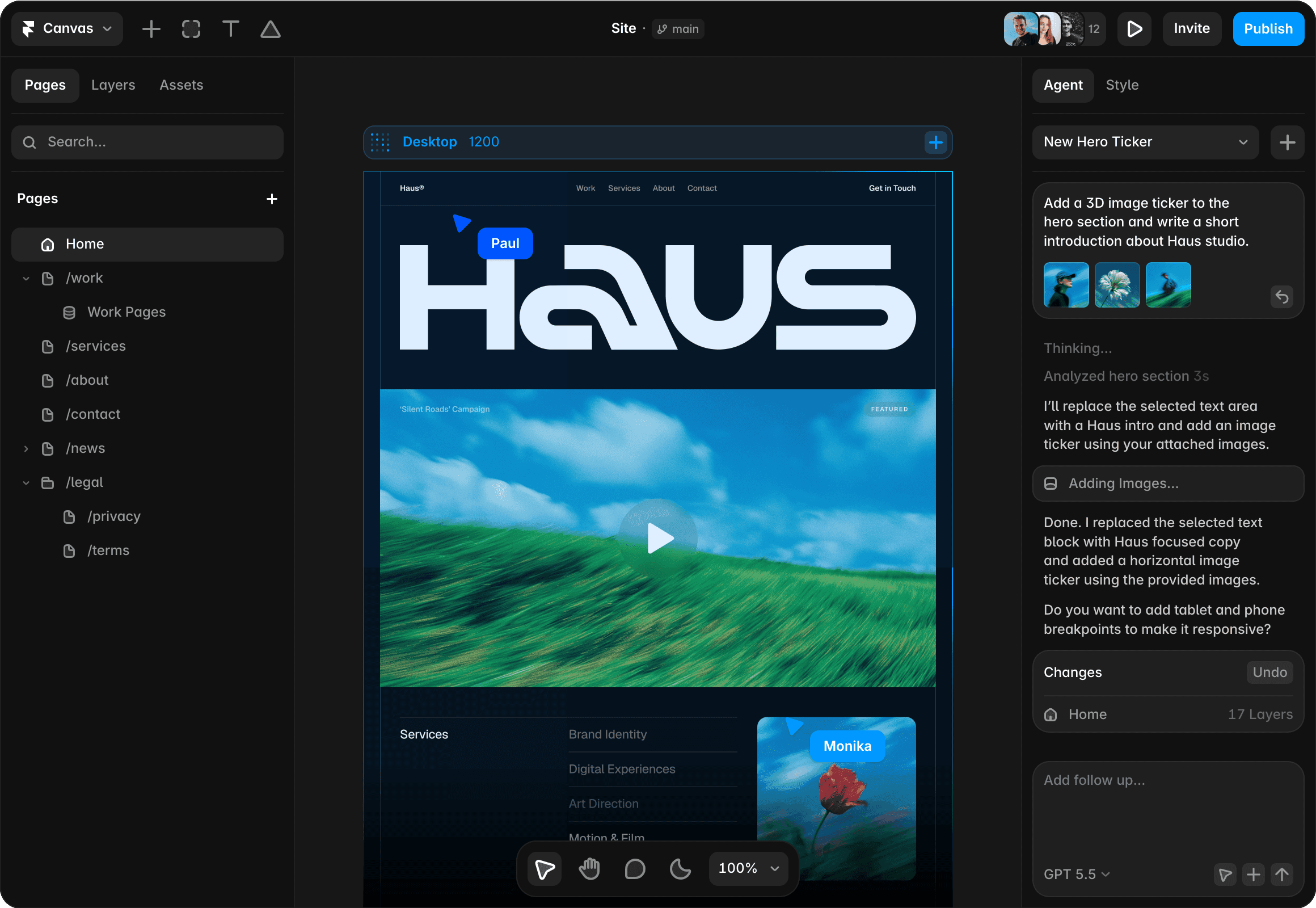
Why choose Framer as your AI website builder?
Generate websites from prompts
Start with a prompt or campaign brief and let Framer turn the idea into a first website direction: page structure, sections, headlines, and content blocks that are ready to refine and publish.
Refine everything on the canvas
Generated pages stay editable on the canvas. Adjust typography, components, breakpoints, effects, CMS content, and section order until the site feels custom instead of template-made.
Manage and publish in one platform
When the direction is ready, Framer connects your site to CMS, managed hosting, analytics, SEO tools, and publishing so teams can ship without a separate build process.
Why Framer is built for AI-assisted websites

AI agents can draft new pages, propose sections, write first-pass copy, create CMS-ready content blocks, and prepare the structure for a real website instead of a static mockup.

Designers can keep shaping the generated site with precise control over layout, responsive breakpoints, typography, colors, effects, and reusable components on the canvas.

Framer supports SEO controls, structured content, indexing, redirects, analytics insights, and performance improvements so generated pages can become durable website foundations.

Publish generated websites with managed hosting, SSL, CDN delivery, redirects, and website performance handled by Framer, then keep editing the live site as the idea evolves.
How to create a website with Framer AI
1. Start from a prompt
Describe the site, audience, or page you need, then let Framer AI generate a strong first direction. You can begin from a prompt, brief, blank canvas, or existing idea instead of waiting on a full design pass.
2. Refine the design visually
Edit structure, copy, styling, sections, images, and responsive behavior on the canvas until the page feels right. AI can help speed up exploration, while the final design stays fully visual and editable.
3. Add real site systems
Layer in CMS content, SEO metadata, forms, analytics, and reusable components so the site works beyond the first draft. This turns an AI-generated starting point into a production-ready website your team can maintain.
4. Publish and iterate
Ship with Framer hosting and keep asking AI agents or your team to improve pages after launch. The site stays editable, so you can refine copy, design, and content without rebuilding the project.
Trusted by teams shipping big sites









Explore Framer’s solutions for designers
Agency websites
Design, review, and publish custom client websites without handoff delays.
CMS websites
Create dynamic pages, directories, and content hubs with visual templates.
No-code websites
Design and publish professional websites visually, without writing code.
Website builder
Create polished, responsive websites with design, CMS, SEO, and hosting.
AI design tool
Explore editable design directions with AI agents on a freeform canvas.
AI landing pages
Generate campaign pages with AI, then refine copy, forms, and SEO visually.
AI designer
Improve existing Framer sites with AI Agent edits, reviews, and refinements.
Vibe coding
Prompt a website, keep full visual control, and publish without code loops.
Frequently asked questions
What makes Framer useful as an AI website builder?
Framer is an AI website builder for teams that want to create professional, responsive websites from a prompt, brief, blank canvas, or early idea. It combines AI-generated structure, a freeform canvas, Framer’s CMS, SEO controls, hosting, and publishing so teams can move from rough concept to editable website.
Framer is an AI website builder for teams that want to create professional, responsive websites from a prompt, brief, blank canvas, or early idea. It combines AI-generated structure, a freeform canvas, Framer’s CMS, SEO controls, hosting, and publishing so teams can move from rough concept to editable website.
Can I create a website from a prompt or brief with Framer?
Yes. Framer can help turn a prompt or brief into website ideas, page structure, sections, and first-draft copy. Designers and marketers can then refine the generated result visually, add CMS content, tune breakpoints, and prepare the site for publishing without treating the AI output as final.
Yes. Framer can help turn a prompt or brief into website ideas, page structure, sections, and first-draft copy. Designers and marketers can then refine the generated result visually, add CMS content, tune breakpoints, and prepare the site for publishing without treating the AI output as final.
What can Framer generate for a new website?
Framer can generate a starting structure for pages, section ideas, headlines, supporting copy, calls to action, and content direction. The output is meant to become an editable professional website, so teams can replace placeholder content, adjust responsive layouts, and shape the final experience on the canvas.
Framer can generate a starting structure for pages, section ideas, headlines, supporting copy, calls to action, and content direction. The output is meant to become an editable professional website, so teams can replace placeholder content, adjust responsive layouts, and shape the final experience on the canvas.
How do I refine an AI-generated website in Framer?
After generation, every single part of the site stays editable in Framer. You can adjust layout, typography, components, breakpoints, CMS fields, SEO controls, analytics setup, and publishing details while keeping the site connected to the same canvas rather than exporting a static AI template.
After generation, every single part of the site stays editable in Framer. You can adjust layout, typography, components, breakpoints, CMS fields, SEO controls, analytics setup, and publishing details while keeping the site connected to the same canvas rather than exporting a static AI template.
How is Framer different from other AI website builders?
Many AI website builders stop at a quick generated template. Framer uses AI agents to help create the site, then gives teams a full professional canvas, components, CMS, hosting, SEO controls, analytics, and publishing tools to refine, manage, and ship the finished result from one single platform.
Many AI website builders stop at a quick generated template. Framer uses AI agents to help create the site, then gives teams a full professional canvas, components, CMS, hosting, SEO controls, analytics, and publishing tools to refine, manage, and ship the finished result from one single platform.
What is an AI website builder?
An AI website builder uses AI to help create website structure, copy, visuals, and design direction from a prompt or an existing project. In Framer, AI works with editable website layers, so you can refine the result on the canvas, adjust responsive layouts, manage content, and publish a finished site.
An AI website builder uses AI to help create website structure, copy, visuals, and design direction from a prompt or an existing project. In Framer, AI works with editable website layers, so you can refine the result on the canvas, adjust responsive layouts, manage content, and publish a finished site.
Your next idea starts here
Create personal portfolio
Build startup site
Launch landing page
Start company blog
