Search
Design, refine, and publish professional websites with Framer’s AI Agent
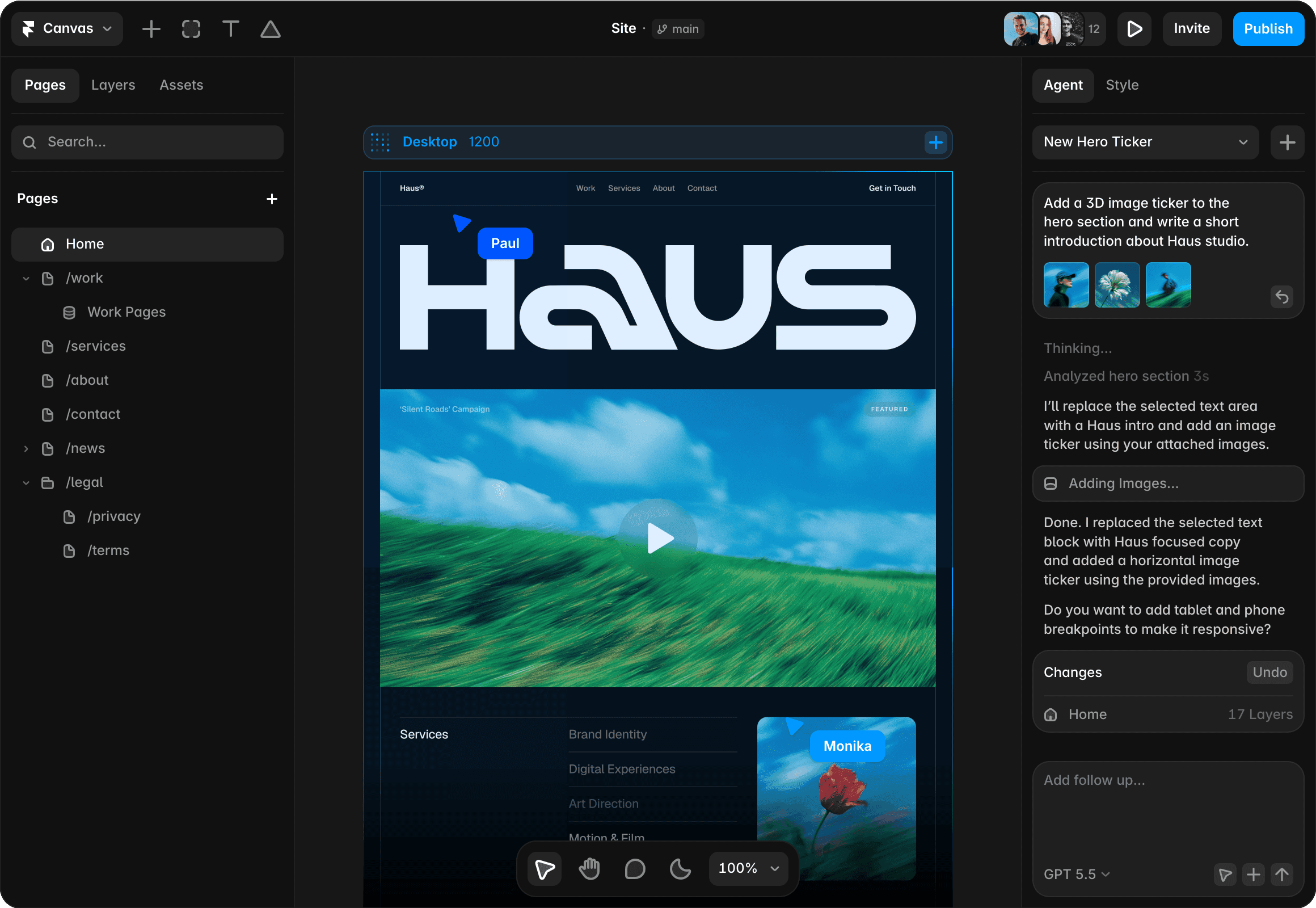
Framer’s AI designer experience is built for improving existing websites, not just generating a first draft. Ask AI agents to review pages, rewrite copy, adjust layouts, update CMS content, check SEO gaps, and keep every change editable on the Framer canvas.
Canvas
Site
·
main
12



Invite
Publish
Pages
Layers
Assets
Search…
Pages
Home
/work
Work Pages
/services
/about
/contact
/news
/legal
/privacy
/terms
100%
Desktop
1200




Paul
Monika
Agent
Style
Position
Type
Relative
Size
Width
900
Fixed
Height
325
Fit
Min Max
Layout
Styles
Visible
Yes
No
Opacity
1
Fill
999999
Border
Shadows
Radius
20
Padding
20
Filters
Sorting
Pagination
Agent
Style
New Hero Ticker
Add a 3D image ticker to the hero section and write a short introduction about Haus studio.



Thinking...
Thinking...
Analyzed hero section 3s
I’ll replace the selected text area with a Haus intro and add an image ticker using your attached images.
Adding Images…
Done. I replaced the selected text block with Haus focused copy and added a horizontal image ticker using the provided images.
Do you want to add tablet and phone breakpoints to make it responsive?
Changes
Undo
Home
17 Layers
GPT 6.1 Sol
Why choose Framer for AI web design?
Design with AI on a visual canvas
Use the visual canvas as the place where AI suggestions become real edits. Designers can review each change, adjust the details, and keep ownership over layout, messaging, and visual direction with confidence.
Collaborate with AI agents
Ask AI agents to improve live pages by rewriting copy, tightening sections, updating CMS content, adjusting styling, reviewing accessibility, and resolving site issues while the team stays in control throughout.
Publish without engineering handoff
Framer connects AI-assisted site improvement with managed hosting, SEO tools, analytics insights, collaboration, and publishing, so teams can keep shipped websites accurate and useful over time with less handoff.
Why teams use AI agents in Framer

Agent edits stay visible and editable on the Framer canvas, so designers and marketers can approve, refine, or undo changes instead of accepting AI output disconnected from the page.

Framer supports metadata, structured content, indexing, analytics insights, and answer-focused improvements that help teams clarify what visitors and search engines need next.

Teams can use AI assistance to keep published websites current: refine copy, update CMS entries, improve sections, and make changes without a slow handoff between tools.

Framer connects AI Agent edits with website performance, Framer’s CMS, collaboration, and publishing, helping teams keep live websites improving long after launch.
How Framer’s AI designer workflow works
1. Ask for design help
Use AI agents to review pages, suggest layouts, rewrite copy, or explore a new direction from your brief. Framer makes AI useful inside a real design workflow instead of leaving you with a disconnected mockup.
2. Choose and refine
Keep the useful ideas, adjust the layout visually, and tune the page until it matches your brand and intent. You stay in control of spacing, typography, hierarchy, and responsive behavior throughout the process.
3. Connect site content
Add CMS content, SEO metadata, images, components, and interactions so the design is ready for the web. This turns AI-assisted exploration into a page that can actually be published and maintained.
4. Publish the final page
Ship with hosting, staging, custom domains, and redirects, then keep improving the live site visually. AI can keep supporting edits after launch while the site remains fully editable by your team.
Trusted by teams shipping big sites









Explore Framer’s solutions for designers
AI website builder
Generate a website with AI, refine it visually, and publish from one place.
AI design tool
Explore editable design directions with AI agents on a freeform canvas.
AI landing pages
Generate campaign pages with AI, then refine copy, forms, and SEO visually.
Figma to website
Turn Figma designs into responsive, editable websites ready to publish.
Figma to HTML
Import Figma layouts, refine them for the web, and publish responsive sites.
Design tool
Explore ideas on a freeform canvas and move the best direction to the web.
Portfolio websites
Showcase design, photography, and creative work with a custom portfolio.
Vibe coding
Prompt a website, keep full visual control, and publish without code loops.
Frequently asked questions
What is an AI designer for websites?
An AI designer for websites helps improve page design, content, and structure after a site already exists or while it is being refined. In Framer, AI agents can review pages, suggest edits, rewrite copy, adjust layouts, and keep changes editable on the canvas.
An AI designer for websites helps improve page design, content, and structure after a site already exists or while it is being refined. In Framer, AI agents can review pages, suggest edits, rewrite copy, adjust layouts, and keep changes editable on the canvas.
How does Framer’s AI Agent improve existing sites?
Framer’s AI Agent can help rewrite sections, adjust layouts, update Framer’s CMS items, review SEO gaps, improve responsiveness, and surface issues from the side panel inside the project. Designers and marketers can inspect each edit visually before publishing it with confidence.
Framer’s AI Agent can help rewrite sections, adjust layouts, update Framer’s CMS items, review SEO gaps, improve responsiveness, and surface issues from the side panel inside the project. Designers and marketers can inspect each edit visually before publishing it with confidence.
Can an AI Agent update CMS content and page copy?
Yes. AI agents can help update CMS entries, rewrite page copy, expand thin content, clarify headlines, and improve FAQ answers while keeping the content connected to the page design. This makes ongoing site maintenance faster, clearer, and easier to review without separating copy work from the canvas.
Yes. AI agents can help update CMS entries, rewrite page copy, expand thin content, clarify headlines, and improve FAQ answers while keeping the content connected to the page design. This makes ongoing site maintenance faster, clearer, and easier to review without separating copy work from the canvas.
Can Framer AI review SEO, accessibility, and layout issues?
Yes. Framer AI can help teams review pages from the side panel for SEO gaps, unclear answers, accessibility issues, layout problems, and responsive details that need attention across the site. It is most useful as an editable review-and-improvement layer for pages that already have a clear direction and well-defined goals.
Yes. Framer AI can help teams review pages from the side panel for SEO gaps, unclear answers, accessibility issues, layout problems, and responsive details that need attention across the site. It is most useful as an editable review-and-improvement layer for pages that already have a clear direction and well-defined goals.
Do AI Agent changes stay editable in Framer?
Yes. AI Agent changes stay on the Framer canvas, so teams can keep editing text, components, breakpoints, CMS content, SEO controls, and publishing details after the assistant makes a suggestion. The goal is practical improvement, with full editorial control and review, not a locked generated result.
Yes. AI Agent changes stay on the Framer canvas, so teams can keep editing text, components, breakpoints, CMS content, SEO controls, and publishing details after the assistant makes a suggestion. The goal is practical improvement, with full editorial control and review, not a locked generated result.
Your next idea starts here
Create personal portfolio
Build startup site
Launch landing page
Start company blog
