Search
Vibe code websites with visual control in Framer
Framer is a visual alternative to vibe coding, built for teams that want to prompt, edit, and publish websites without maintaining generated code. AI agents move the build forward on the canvas, backed by the CMS, SEO, and hosting needed to ship a real site.
Canvas
Site
·
main
12



Invite
Publish
Pages
Layers
Assets
Search…
Pages
Home
/work
Work Pages
/services
/about
/contact
/news
/legal
/privacy
/terms
100%
Desktop
1200




Paul
Monika
Agent
Style
Position
Type
Relative
Size
Width
900
Fixed
Height
325
Fit
Min Max
Layout
Styles
Visible
Yes
No
Opacity
1
Fill
999999
Border
Shadows
Radius
20
Padding
20
Filters
Sorting
Pagination
Agent
Style
New Hero Ticker
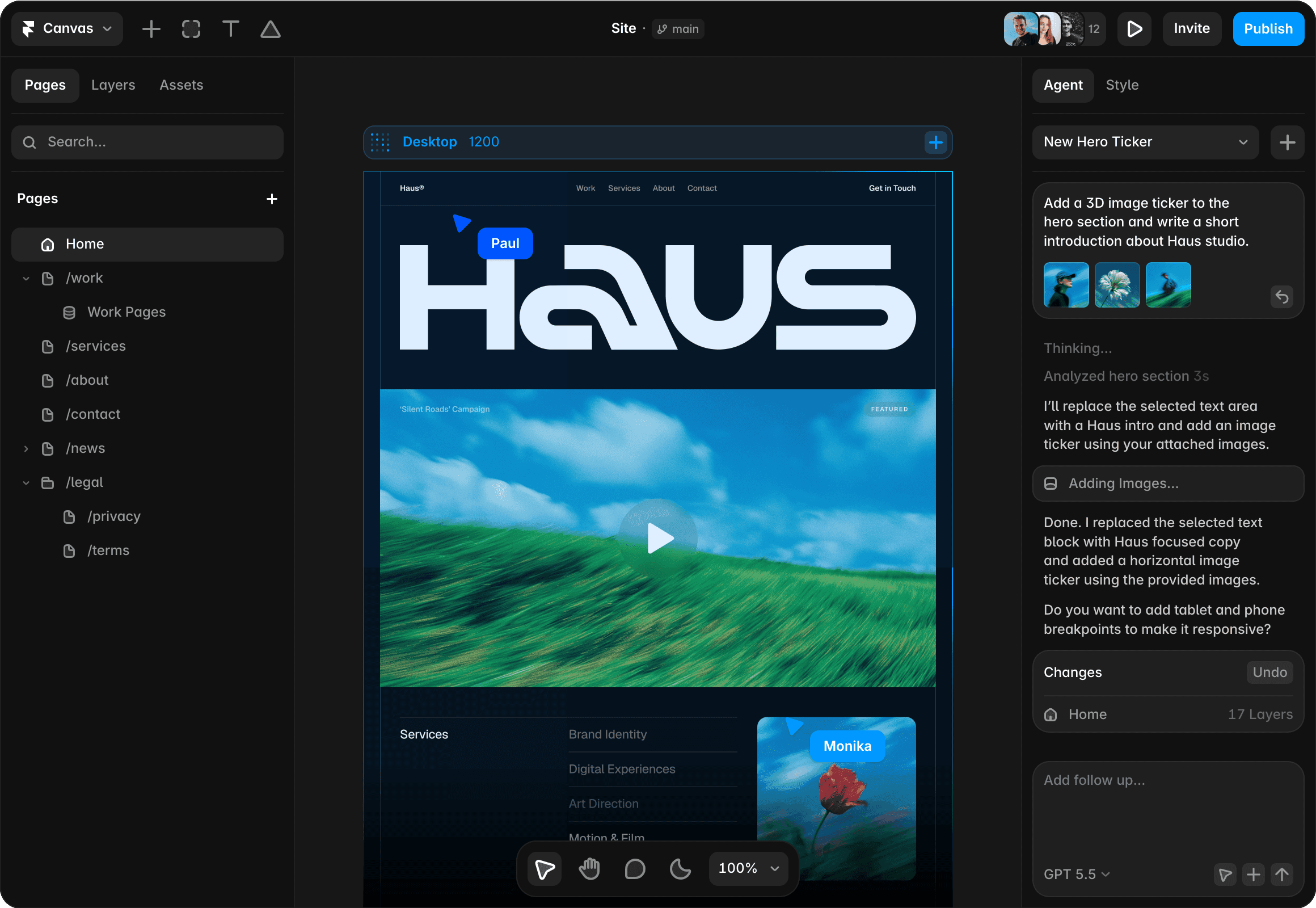
Add a 3D image ticker to the hero section and write a short introduction about Haus studio.



Thinking...
Thinking...
Analyzed hero section 3s
I’ll replace the selected text area with a Haus intro and add an image ticker using your attached images.
Adding Images…
Done. I replaced the selected text block with Haus focused copy and added a horizontal image ticker using the provided images.
Do you want to add tablet and phone breakpoints to make it responsive?
Changes
Undo
Home
17 Layers
GPT 6.1 Sol
Use AI without losing control
Start from a prompt
Use AI agents to generate ideas, draft sections, rewrite copy, and explore page directions quickly before refining the site visually. Turn the first AI pass into real sections, editable content, and a clearer page path.
Edit the result visually
Keep editing real layers, typography, layout, and interactions in the Framer canvas instead of managing generated code by hand. Keep the speed of prompting while designers refine the actual page on the canvas.
Publish without code loops
Go from idea to live website with no-code publishing instead of wrestling with build steps, deploy config, or packages. Publish with Framer hosting, CMS, SEO settings, and analytics instead of a code handoff.
Why Framer fits visual website creation

Pages stay fully editable in the visual canvas, whether built by hand or drafted by AI, instead of turning into code someone on the team has to maintain manually.

Publish a finished design as a live website with Framer. Preview every breakpoint, then keep your site fast, editable, and easy to improve with Framer’s hosting.

Work together in real time, leave feedback, preview changes, and keep every update safely organized. Move fast without stepping on each other’s work.

Publish fast, secure global sites with Framer hosting. Atomic deploys, automatic optimization, and built-in protection keep every launch smooth from preview to production.
How AI-assisted website building works
1. Prompt the first version
Use AI agents to draft sections, rewrite copy, or explore layouts without committing to generated code. Framer gives you the speed of prompting while keeping the output visual and editable.
2. Edit on the canvas
Keep every section visual and editable, from spacing and typography to responsive behavior and interactions. You can refine the page like a designer instead of debugging a generated codebase.
3. Add production details
Connect CMS content, SEO settings, forms, analytics, and navigation so the page becomes a real functioning website. This turns AI-assisted building into a maintainable publishing workflow that teams can keep improving.
4. Publish without code loops
Launch through Framer’s hosting and keep improving pages visually instead of maintaining a generated codebase. The site stays approachable for designers, marketers, and founders after the first version ships.
Trusted by teams shipping big sites









Explore Framer’s solutions for designers
Agency websites
Design, review, and publish custom client websites without handoff delays.
CMS websites
Create dynamic pages, directories, and content hubs with visual templates.
No-code websites
Design and publish professional websites visually, without writing code.
AI website builder
Generate a website with AI, refine it visually, and publish from one place.
Website builder
Create polished, responsive websites with design, CMS, SEO, and hosting.
AI design tool
Explore editable design directions with AI agents on a freeform canvas.
AI landing pages
Generate campaign pages with AI, then refine copy, forms, and SEO visually.
AI designer
Improve existing Framer sites with AI Agent edits, reviews, and refinements.
Frequently asked questions
What is a vibe coding website builder?
A vibe coding website builder is a tool or workflow where AI helps generate websites from prompts, often by producing code. Framer keeps the AI-assisted workflow visual with AI agents, so teams can keep refining the actual page instead of maintaining generated code. AI output stays editable in the same project.
A vibe coding website builder is a tool or workflow where AI helps generate websites from prompts, often by producing code. Framer keeps the AI-assisted workflow visual with AI agents, so teams can keep refining the actual page instead of maintaining generated code. AI output stays editable in the same project.
How is Framer different from vibe coding tools?
Framer lets you use AI while keeping websites visually editable, CMS-powered, SEO-ready, and publishable without managing generated code, packages, or deployment pipelines. That makes it a better fit for marketing sites, landing pages, and content-driven websites. Teams keep speed, brand control, and SEO structure.
Framer lets you use AI while keeping websites visually editable, CMS-powered, SEO-ready, and publishable without managing generated code, packages, or deployment pipelines. That makes it a better fit for marketing sites, landing pages, and content-driven websites. Teams keep speed, brand control, and SEO structure.
Can I build AI-assisted websites in Framer?
Framer includes AI agents for creating, editing, rewriting, and refining websites while preserving visual control over layout, content, and brand details. You can use AI to move faster without giving up design ownership.
Framer includes AI agents for creating, editing, rewriting, and refining websites while preserving visual control over layout, content, and brand details. You can use AI to move faster without giving up design ownership.
Do I need to debug code in Framer?
No. Framer is a visual website builder, so teams can edit pages, content, CMS fields, SEO settings, and publishing details without working directly in code. Developers can still extend projects, but most website updates can stay visual.
No. Framer is a visual website builder, so teams can edit pages, content, CMS fields, SEO settings, and publishing details without working directly in code. Developers can still extend projects, but most website updates can stay visual.
Is Framer good for AI-generated marketing websites?
Framer is well suited for AI-assisted landing pages, marketing sites, CMS pages, SEO pages, and fast publishing workflows with Framer’s hosting included. It is focused on making finished websites editable, structured, and easy to publish. The site can keep changing after the first AI pass.
Framer is well suited for AI-assisted landing pages, marketing sites, CMS pages, SEO pages, and fast publishing workflows with Framer’s hosting included. It is focused on making finished websites editable, structured, and easy to publish. The site can keep changing after the first AI pass.
Your next idea starts here
Create personal portfolio
Build startup site
Launch landing page
Start company blog
